Not another chatbot
General AI assistants don't know your files, meetings, or screen history. GrepMind does — with citations.
 GrepMind
Private AI Knowledge Engine for Mac
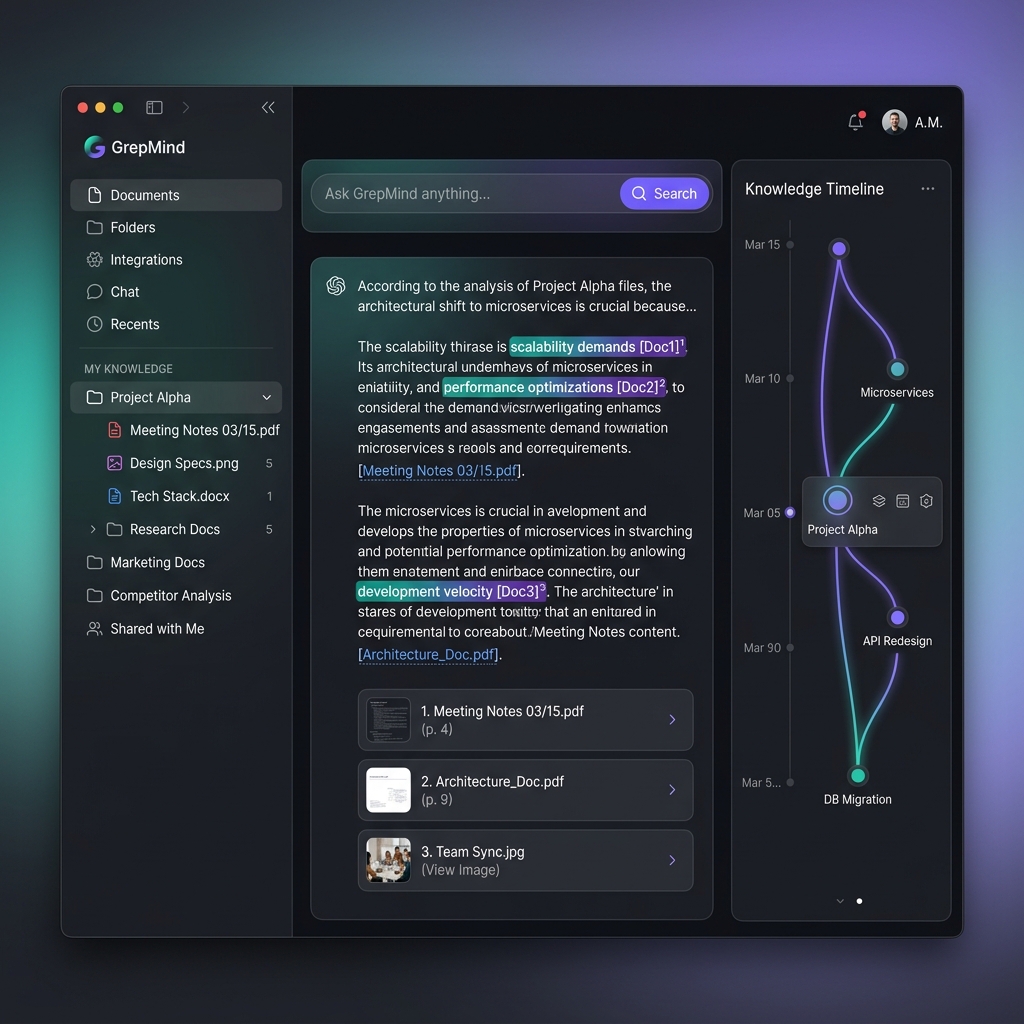
GrepMind turns your files, meetings, media, and screen history into a local-first knowledge engine with cited answers, instant reports, and intelligent agent assistance.
Why GrepMind
Other tools require you to start from scratch. GrepMind starts with what you already have — your files, recordings, screenshots, and meetings — and makes them searchable, citable, and actionable.
General AI assistants don't know your files, meetings, or screen history. GrepMind does — with citations.
You don't need to write notes first. GrepMind builds your knowledge base automatically from existing files and recordings.
Meeting tools forget your context after the call. GrepMind connects meetings to your documents, images, and screen history.
Product
GrepMind is not another blank editor. It starts with the knowledge you already have: local folders, PDFs, images, recordings, videos, meetings, and the screen moments you choose to save.
Every answer is grounded in sources — you can jump back to the exact file, page, timestamp, transcript, or screenshot behind the result.
Index selected folders, documents, photos, audio, video, meetings, and screenshots with clear controls for what stays out.
Combine OCR, transcription, metadata, semantic search, entity extraction, timelines, and knowledge graph signals.
Ask natural-language questions and get concise answers with citations, context, related sources, and follow-up paths.
Turn your knowledge base into reports, meeting summaries, HTML visualizations, PPT outlines, and message drafts.
Core Workflow
Select local folders, media libraries, meeting recordings, and optional screen memory sources.
GrepMind extracts text, transcripts, visual cues, timestamps, entities, and semantic relationships.
Search by natural language, filter by source or time, and inspect the citations behind every answer.
Generate project reports, research briefs, meeting follow-ups, visual pages, and presentation drafts.
Privacy Model
GrepMind is designed for sensitive work. Local indexing is the default. Cloud models are optional, and the app explains what context is sent before it leaves your device.
Advanced Roadmap
The long-term version of GrepMind can assist in meetings, understand voice and text context, draft replies for Feishu, WeChat, email, or other work channels, and act only within rules you approve.
The principle is simple: GrepMind may draft freely, advise privately, and act with approval. Anything sent to another person shows the content, recipient, account, and source context first.
Prepare replies, meeting talking points, and follow-up messages from your knowledge base.
Listen during permitted meetings, surface relevant sources, and suggest questions or answers in real time.
Send messages, create tasks, and update records through Feishu, WeChat, or email after explicit confirmation.
Run low-risk approved routines with audit logs, limits, and an emergency pause button.
Use Cases
"What did the investor say about our pricing last month?"
GrepMind finds the meeting transcript, the related pitch deck, and your follow-up email draft.
"Generate a weekly status report from this week's meetings and docs."
GrepMind synthesizes 5 meetings, 12 documents, and 3 Slack threads into a cited report.
"Find everything we know about competitor X across all sources."
GrepMind searches PDFs, images, meeting transcripts, and screen history with source links.
"Draft a follow-up email based on today's client call."
GrepMind uses meeting notes + project files to draft a contextual reply for your review.
"Where did we discuss the API rate limit decision?"
GrepMind locates the meeting timestamp, related design doc, and Feishu thread.
"Reply to this Feishu message about the Q3 budget approval."
GrepMind drafts a reply using budget docs and recent meeting decisions, pending your confirmation.
Build Roadmap
Local folders, documents, PDFs, images, OCR, semantic search, cited answers, privacy controls.
Audio and video transcription, meeting summaries, decisions, action items, source linking.
User-enabled screenshot timeline, OCR, app exclusions, and "where did I see that?" retrieval.
Reports, HTML visualizations, PPT drafts, timelines, knowledge graphs, and shareable briefs.
Meeting assistance, reply drafts for Feishu/WeChat/email, approved sends, task creation, controlled delegation.
Trust
Your knowledge base stays on your Mac. Cloud models are optional and require explicit consent per provider.
Before any data leaves your device, GrepMind shows what will be sent, where, and why.
Pause indexing, remove sources, delete everything, and withdraw consent — at any time.
GrepMind
GrepMind is currently in development. For support, developer review, partnership, or early access questions, contact us at support@grepmind.io.